NodeJs
Saving Form Data to a JSON
Now that you can send data to your server through a POST request, we can take things one step further and store that data inside a .json file on your computer. We will use this as our simple database for now.
We will also update the homepage so that when it loads, it reads the JSON file and shows all the saved messages on the screen.
What JSON Is
JSON is a simple data format used to store and organize information. (Great for a mini DB). It stores data using key value pairs, which look like this:
{
  "Name": "Joseph",
  "email": "joseph@gmail.com"
  "message": "Hello my name is Joseph"
}
JSON is perfect for saving structured data because it is easy for humans to read and computers to work with. This makes it great for small projects like this one.
Create the JSON File
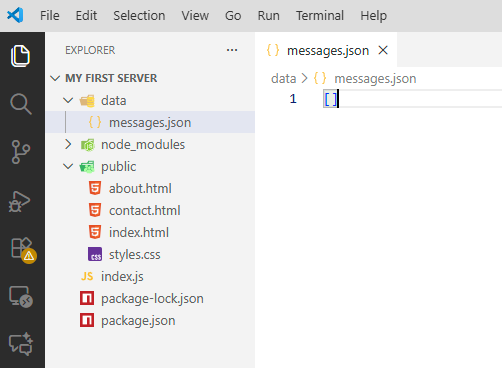
Inside your main project folder, make a new folder called data. Inside that folder, create a file called messages.json. We need to start with an empty array. Put this inside the file and save it:
[]Your folders and file should look like this image below:
Import the File System Module
To read and write to files in Node.js, we need to import the built in fs module from NodeJs. This will give us access to functions like reading, writing, and updating files. At the top of your index.js file, add:
const fs = require("fs");Then add a constant to store the path to your JSON file:
const messagesFilePath = __dirname + "/data/messages.json";__dirname is the absolute path to your project folder. This makes sure your server can always find messages.json.
Keep reading this lesson
You've reached the end of the free preview. Unlock the rest of this lesson plus 8 more lessons in NodeJs.
- Unlimited coding questions
- Unlimited access to all classroom material
- Weekly live call for questions and guidance
- 3,000 AI tutor tokens / month
- Personal SQL database (3 MB)
- Progress tracking
Cancel any time.