Seneca BTP 305
Factory Assembly Line
Assignment 4 - 2025The purpose of this assignment is to put your C++ Object Oriented skills to practice by developing a simulation of an assembly line with any number of stations. A line with 3 Stations is illustrated in the figure below.
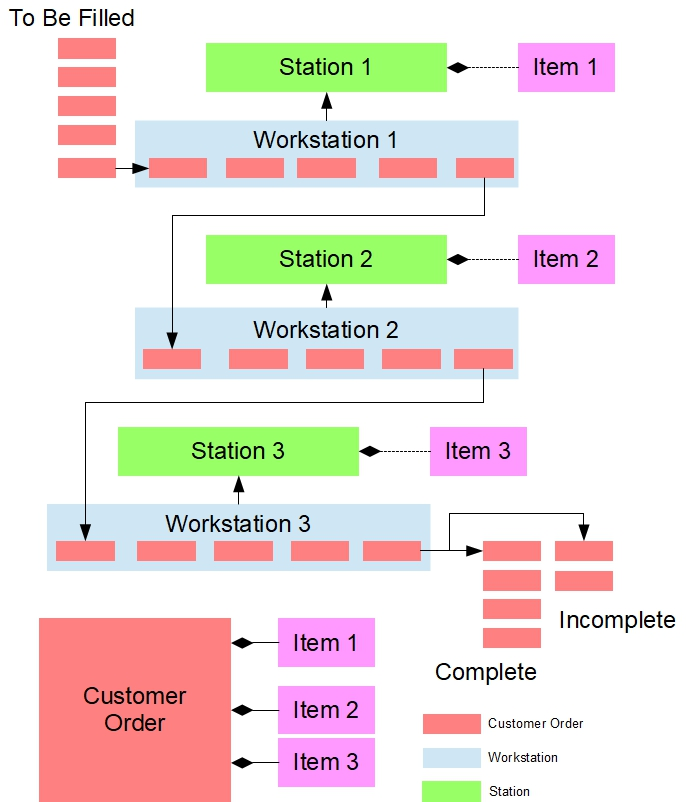
The assembly line in your solution consists of a set of workstations each of which holds a set of stock items, which are specific to the station. A line manager moves customer orders along the line filling the orders at each station, as requested. Each customer order consists of a list of items that need to be filled. Each station processes a queue of orders by filling the next order in the queue if that order requests the station's item and that item is in stock. The line manager keeps moving the customer orders from station to station until all orders have been processed. Any station that has used all the items in stock cannot fill any more orders. At the end of the line orders are either completed or incomplete due to a lack of inventory at one or more stations. The simulator lists the completed orders and those that are incomplete once the line manager has finished processing all orders.
The assignment is divided into 3 testers to help guide you through implementation, debugging and execution. Each tester will focus on different aspects/classes of your solution. For full credit, you must have three submissions (one with each tester); however it is possible to get partial marks by submitting using only some testers.
Compiling and Testing Your Program
All your code should be compiled using this command on matrix:
/usr/local/gcc/10.2.0/bin/g++ -Wall -std=c++17 -g -o asgn file1.cpp file2.cpp ...-Wall: compiler will report all warnings-std=c++17: the code will be compiled using the C++17 standard-g: the executable file will contain debugging symbols, allowing valgrind to create better reports-o asgn: the compiled application will be namedasgn
After compiling and testing your code, run your program as following to check for possible memory leaks (assuming your executable name is asgn):
valgrind --show-error-list=yes --leak-check=full --show-leak-kinds=all --track-origins=yes asgn--show-error-list=yes: show the list of detected errors--leak-check=full: check for all types of memory problems--show-leak-kinds=all: show all types of memory leaks identified (enabled by the previous flag)--track-origins=yes: tracks the origin of uninitialized values (g++must use-gflag for compilation, so the information displayed here is meaningful).
To check the output, use the following command below:
g++ -Wall -std=c++17 -g -o asg *.cpp;
./asg Stations1.txt Stations2.txt CustomerOrders.txt AssemblyLine.txt> myoutput.txt;
diff tester_3_sample_output.txt myoutput.txt
Factory Assembly Line
Tester Modules
To test your application, you are provided with 3 different tester modules (do not modify any of them them):
Keep reading this lesson
You've reached the end of the free preview. Unlock the rest of this lesson plus 17 more lessons in Seneca BTP 305.
- Unlimited coding questions
- Unlimited access to all classroom material
- Weekly live call for questions and guidance
- 3,000 AI tutor tokens / month
- Personal SQL database (3 MB)
- Progress tracking
Cancel any time.