Thompson Rivers University
Warning Sound for Invalid Clicks
Assignment 5 User Interfaces FX - SM 2025We want to make this program interactive so that if the user clicks anywhere other than the radio buttons or the slider, a warning sound is played. This will be the final part of this assignment.
Prepare the Sound File
Before writing any code, make sure you download the .wav file named warning.wav that can be found at the bottom of this page. Drag and drop it into the same file where your class is.
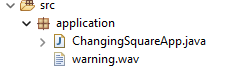
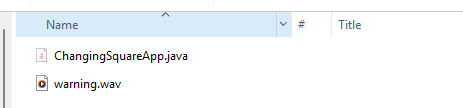
Placing this file in the same directory as your Java file (or inside your project’s resources folder if you're using one) will allow the system to play a warning whenever a disallowed area is clicked.
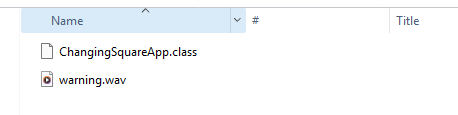
Also add the wave file to your /bin/application/ directory. Inside of this directory you should see a file called ChangingSquareApp.class. Make sure the wave file is next to it like this:
Load the Sound
We create a Media object from the sound file and pass it into a MediaPlayer. This lets us play the sound whenever we want. Add the following code right after creating the VBox root:
URL soundURL = getClass().getResource("warning.wav");
Media warningSound = new Media(soundURL.toString());
MediaPlayer mediaPlayer = new MediaPlayer(warningSound);
This loads the sound and prepares it for playback.
Keep reading this lesson
You've reached the end of the free preview. Unlock the rest of this lesson plus 54 more lessons in Thompson Rivers University.
- Unlimited coding questions
- Unlimited access to all classroom material
- Weekly live call for questions and guidance
- 3,000 AI tutor tokens / month
- Personal SQL database (3 MB)
- Progress tracking
Cancel any time.